


Rock VPN: Fast & Secure
4.714.00 Reviews
App Specs
- Version
- 3.3.0
- Updated On
- License
- Free
- Downloads
- 10,000+
- Developer
- Stergo
- Categories
- Social
- Platform
- Android
Screenshots
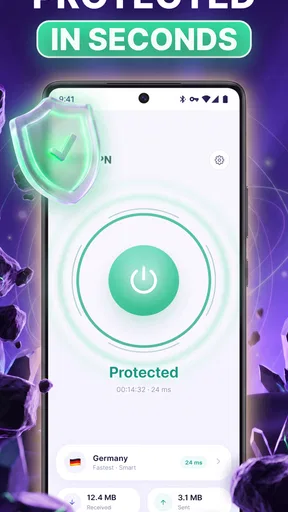
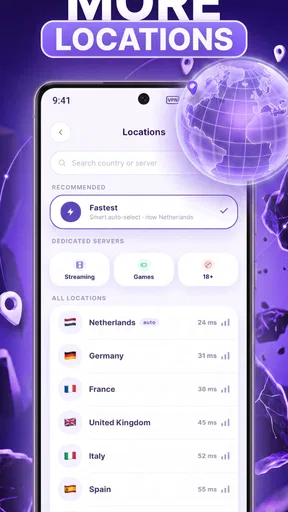
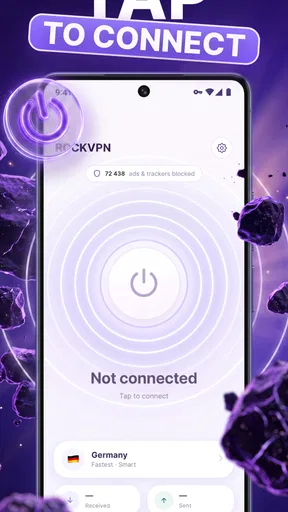
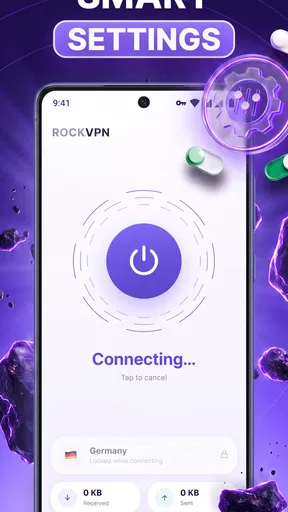
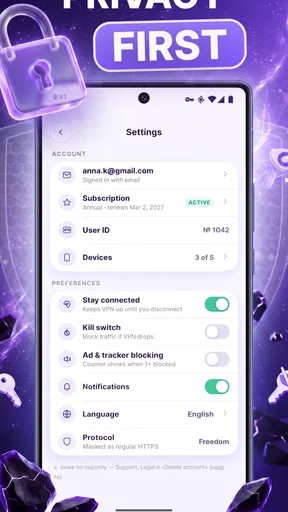
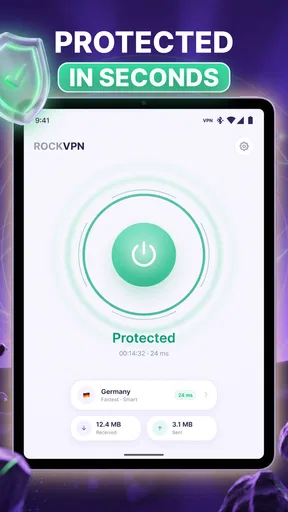
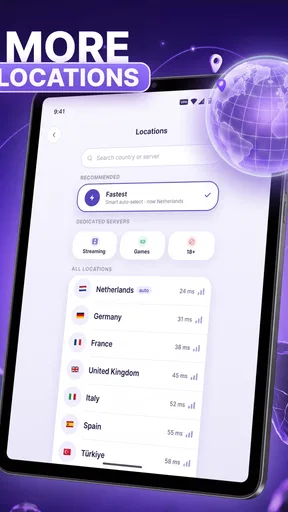
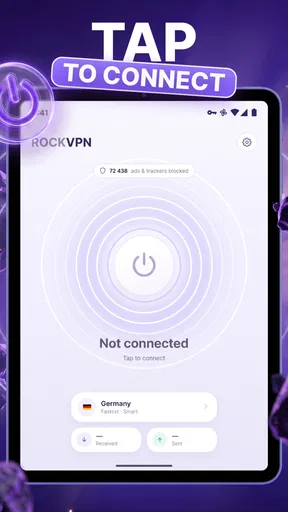
 Analysis by AppCompare
I spent time with Rock VPN as a social-category utility rather than treating it like a simple switch that disappears into the background. Its purpose is straightforward: it creates a VPN connection for ordinary internet use, with the emphasis on a connection that feels fast and steady. That makes it relevant when I am moving between public Wi-Fi, mobile data, and home internet, or when I want an extra privacy layer during routine browsing.
What makes this app worth examining is not a long list of advanced tools, but how comfortably a person can use it in real situations. A VPN can be technically capable and still be frustrating if the controls are hard to understand, the connection state is unclear, or the app demands too much attention. My experience with Rock VPN is best viewed through that practical lens: can I reach the main action easily, understand what is happening, and recover when the connection does not behave as expected?
How Rock VPN feels to use in everyday situations
I find Rock VPN easiest to judge by the small routines it can support: connecting before I use unfamiliar Wi-Fi, then checking that the phone is online before I move on to a sensitive task. That habit can be more useful than keeping a VPN app open and monitoring it all day. It also gives me a practical way to notice whether the connection adds friction to the activities I rely on most.
Readability and navigation without unnecessary effort
The appeal of Rock VPN begins with its narrow focus. I am not opening it to manage a complicated network, tune a large collection of specialist settings, or compare technical connection profiles. I am opening it because I want a VPN connection for the next part of my day. That limited purpose gives the app a more approachable feel than a tool designed primarily for network enthusiasts.
For a first-time VPN user, the most important question is usually not how the underlying technology works. It is whether the app makes the next step obvious. Rock VPN is easier to understand when I treat it as a quick routine: open the app, identify the current connection state, start the service, and return to what I was doing. That sequence is much less intimidating than reading about protocols, tunneling, or server infrastructure before being allowed to browse.
I also appreciate that a focused interface can reduce mental load. Someone who is tired, distracted, or using a small phone screen does not necessarily want several competing choices. A clear primary action is useful for people who prefer simple navigation, including users who are less comfortable with technical vocabulary. In that respect, the app’s everyday positioning is a strength.
Still, simplicity has a limit. If I want to understand why a connection is slow, whether a particular location is being used, or what will happen when the network changes, a minimal VPN experience can leave me wanting more context. A beginner benefits from fewer decisions, but an experienced user may prefer more visible control. Rock VPN makes the most sense for the person who values a quick, understandable connection over detailed customization.
Worth Reading Before You Choose

Flipboard Shows What News Apps Must Do Beyond the Feed

Switching to Android Auto Means Rethinking Your Driving Routine

Google Calendar Makes a Crowded Week Easier to Manage

Ludo King Makes the Most of the Minutes Between Plans

Baby Panda World Brings Quick Play to Modern Phones, but Its Game Library Feels Busy

ESPN’s Live Game View Makes Following Close Games Easier
When I review an app like this, I look for whether the important information can be found without repeated tapping. The connection state should be distinguishable from ordinary labels, and the route back to the main control should feel predictable. That matters for users with attention difficulties or limited patience, because a VPN should not become another task to decode before checking email, reading a message, or joining a call.
The developer, Stergo, has positioned the app as a general-purpose option rather than a specialist console. That positioning is reflected in the way I approach it: I would recommend trying the basic workflow first, then deciding whether the available information is enough for personal needs. There is little value in choosing a supposedly advanced VPN if its extra controls make ordinary use harder.
Motor and sensory considerations during the connection routine
A VPN app has a small number of actions, but that does not make interaction design irrelevant. People with reduced dexterity may need controls that are easy to target, clearly separated, and not dependent on fast gestures. Rock VPN benefits from a workflow that can be completed deliberately. I can open it, pause to check the state, and activate the connection without having to perform a rapid sequence.
That kind of pacing is useful for someone using a phone one-handed, resting the device on a desk, or relying on an alternative touch technique. It also helps when the user is outside and dealing with glare, gloves, or an unstable grip. A focused VPN tool should not punish a person for taking an extra moment before confirming an action.
Sensory needs are more complicated. A connection app should communicate status through more than color alone, because color differences can be difficult to distinguish for some users. I pay attention to whether the wording and layout make the state understandable even when I am not looking carefully at visual indicators. If a user has low vision, enlarged system text and display settings may improve the experience, but those adjustments cannot compensate for labels that are vague or crowded.
For users who are sensitive to interruptions, a VPN should fit quietly into the background. The useful pattern is to activate it before beginning a task, then avoid repeatedly reopening the app just to reassure myself that it is still working. This is also a practical habit for people with cognitive fatigue: establish the connection at a calm moment rather than waiting until a payment page, work login, or video call is already loading.
One non-obvious trade-off is that a faster connection is not always the most comfortable connection. If a VPN reconnects or changes behavior while I am moving between networks, the user may notice a short interruption at exactly the wrong time. A person with hearing or vision limitations may not notice a subtle status change. I therefore prefer to start Rock VPN before entering a sensitive task, and I avoid assuming that an active-looking screen means every app has already recovered from a network transition.
People who use screen readers or other assistive technologies should judge the actual labels and reading order on their own device before relying on the app for important tasks. I would not claim that Rock VPN has a particular accessibility certification or a guaranteed experience with every assistive setup. The sensible approach is to test the main action, connection status, and any confirmation screens during a low-risk browsing session.
Situational access: where the app earns its place
Rock VPN is most useful when my internet context changes. Imagine that I am working from a café, checking a travel booking, and then moving outside to mobile data. I can establish the VPN connection before opening the booking service, continue with the task, and later decide whether I still need it at home. That is a realistic use case because it adds a small privacy step without requiring a complete change to my normal browsing habits.
It can also help users who find public networks stressful. The app does not remove every risk associated with online accounts, and I would still use strong passwords, device updates, and careful judgment about suspicious pages. However, having a familiar VPN routine can make network switching feel more manageable. For someone who needs predictable steps, that consistency may matter as much as raw speed.
Another useful situation is shared travel. If I am using a phone in a hotel, station, or airport, I would rather activate the VPN before signing into a service than remember halfway through the process. This is especially helpful for users with memory challenges: the app can become part of a simple checklist—connect, verify the device is online, then continue. The important point is to build the habit before sensitive activity, not after.
Rock VPN may also suit people who want a low-friction privacy tool for ordinary reading and communication. It is not necessary to be a networking expert to understand the basic benefit of routing traffic through a VPN. The app’s free entry point lowers the barrier to trying that workflow, although optional purchases are listed at prices ranging from $4.99 to $49.99 per item. I would examine any purchase screen carefully and avoid paying simply because I feel rushed by a connection problem.
Its age rating of Everyone makes the app broadly approachable from a content standpoint. That does not mean every person will find the interface equally comfortable, but it does support the idea that this is intended for general household use rather than a narrow professional audience. Parents, older relatives, and less technical users may be able to start with the same basic routine, provided someone helps them understand what a VPN does and when it should be active.
The app’s current version is 3.3.0, and it supports devices running at least iOS or Android 9. That compatibility range is useful for people who keep an older phone, though device age can affect performance independently of the app. On an older handset, I would pay attention to battery behavior, switching between networks, and whether other apps remain responsive. A VPN that is comfortable on a recent phone may feel different on hardware with limited resources.
What can still create barriers
The biggest barrier is not necessarily the connection button; it is understanding the boundaries of VPN protection. A person may assume that turning on Rock VPN makes every online action private or safe. That would be too broad. A VPN does not replace account security, careful browsing, software updates, or awareness of scams. New users need a short explanation in plain language, otherwise the app’s simplicity may encourage overconfidence.
There is also a practical tension between convenience and troubleshooting. When browsing feels slow, I want to know whether the issue comes from the VPN, the local network, the website, or the phone. A streamlined app may not expose enough detail for that diagnosis. If I depend on a stable connection for remote work, accessibility services, or live communication, I would test Rock VPN during ordinary conditions before making it part of a critical routine.
People with limited data plans should consider the wider effect of any always-on privacy habit. Even when the VPN itself is convenient, maintaining a connection while traveling can interact with battery use and network quality. I would activate it for the tasks that benefit most, then review whether leaving it enabled all day is actually useful. This selective approach can be easier for users who prefer clear start-and-stop routines.
Purchases are another point where inclusive design meets practical decision-making. The app is free to install, but in-app items range from $4.99 to $49.99. That is a wide enough span that I would not recommend upgrading casually, particularly for a family member who may have difficulty interpreting a purchase screen. Anyone using a shared device should understand which option is being selected and whether the benefit is relevant to their actual use.
Users who require highly specific server selection, extensive connection diagnostics, or advanced policy controls may find a specialist VPN more suitable. A different option can also be better for someone who needs a clearly documented workflow for work, school, or managed devices. Rock VPN’s strength is approachability, not a promise of deep administration. Choosing it for the wrong reason would create frustration later.
There is a further barrier for people who need guaranteed compatibility with a particular accessibility setup. I would test the app with the exact screen reader, magnification mode, switch access method, or display configuration that I use. A general-purpose design can be perfectly manageable for one person and awkward for another. That is not a criticism unique to VPNs; it is why a short, low-risk trial is more valuable than assuming that an age rating tells me how accessible the controls will feel.
How it compares with familiar VPN alternatives
Compared with using no VPN at all, Rock VPN adds a simple privacy step that can be especially reassuring on unfamiliar networks. Compared with a browser-only privacy feature, it is aimed at the device’s broader internet activity rather than just one browsing session. That distinction matters if I switch between a browser, messaging app, and another service during the same outing.
Compared with large, feature-heavy VPN products, Rock VPN feels better suited to people who do not want to study a dashboard. A specialist alternative may offer more locations, deeper diagnostics, or more explicit controls, but those advantages can introduce extra decisions and smaller touch targets. For a user with cognitive fatigue or limited dexterity, fewer choices may be the more meaningful benefit.
On the other hand, a feature-rich competitor may be the better choice for someone who regularly troubleshoots networks, needs a particular location, or wants extensive control over how different apps connect. I would not choose Rock VPN solely because it is easy to start. The right question is whether the app gives enough feedback and control for the situations that matter to me.
The free price is a practical advantage for testing the basic experience. It lets me see whether the connection fits my phone, habits, and accessibility needs before committing money. The presence of optional purchases means I would compare the actual benefit of an upgrade with free alternatives and with the cost of a more established service. A low initial barrier is helpful, but it should not replace careful evaluation.
My inclusive verdict for everyday use
Rock VPN is a sensible choice for people who want a straightforward VPN routine rather than a technical project. I like its focus on ordinary internet use, and I can see why it has reached an average rating of 4.8 from around 154 ratings, with over 10K installs. Those figures suggest a positive early reception, while the relatively compact review volume means I would still judge it by my own device and network instead of treating popularity as a guarantee.
My strongest recommendation is for users who value a calm, repeatable workflow: connect before using public Wi-Fi, check that the device is online, and continue with the task. That approach is friendly to people who prefer fewer controls, users who are new to VPNs, and anyone who needs to reduce the number of decisions made under pressure. It also works well for relatives who need a privacy tool explained in everyday language.
I would be more cautious for people who need detailed diagnostics, specialized routing, guaranteed assistive-technology compatibility, or a VPN for high-stakes professional work. They should test the app under realistic conditions and compare it with a more configurable alternative. The same caution applies to anyone considering an in-app purchase: first confirm that the free workflow solves the actual problem.
Overall, I see Rock VPN as an approachable social utility with a useful place in daily phone habits. Its value is not that it eliminates every online risk or solves every network problem. Its value is that it can make adding a VPN connection feel manageable. For me, the deciding advantage is the low-friction routine, while the deciding limitation is the need to verify whether its level of feedback is enough for my particular device, network, and accessibility setup.
Pros
- Simple one-tap connection makes setup quick for beginners.
- Offers access to multiple server locations for flexible browsing.
- Helps secure data on public Wi-Fi networks.
- Lightweight design keeps navigation fast and uncomplicated.
- Useful for accessing content that may be restricted by location.
Cons
- Free access may include ads or usage limitations.
- Connection speeds can vary depending on server load.
- Some servers may have higher latency for gaming or calls.
- VPN protection may reduce battery life during extended use.
- Privacy details should be checked carefully before entering sensitive data.
FAQs for Rock VPN: Fast & Secure
What is Rock VPN and how does it work?
Rock VPN is a virtual private network app designed to route your internet traffic through a VPN server instead of connecting directly to websites and online services. This can help protect your connection on public Wi-Fi, hide your IP address from the sites you visit, and provide access to servers in different locations. However, it should not be treated as complete anonymity or a replacement for safe browsing habits.
Is Rock VPN free to use, and are there any limitations?
Rock VPN may offer free access, but the exact features available can depend on the current version, region, and subscription model. Free VPN services commonly include advertising, a smaller selection of server locations, connection limits, or slower speeds during busy periods. Before downloading, check the app’s in-app purchase details and privacy information so you understand whether premium features, recurring billing, or usage restrictions apply.
Can Rock VPN protect me when using public Wi-Fi?
A VPN such as Rock VPN can add an important layer of protection when you connect through public networks in cafés, hotels, airports, or schools. By encrypting traffic between your device and the VPN server, it can make casual interception more difficult. Nevertheless, you should still use HTTPS websites, avoid suspicious links, keep your device updated, and never assume that a VPN can protect you from phishing, malware, or unsafe account practices.
Will Rock VPN work with streaming, gaming, and other apps?
Rock VPN can work with many browsers and mobile applications, but performance and compatibility may vary depending on the selected server, your location, network quality, and the service being accessed. Streaming platforms may block known VPN addresses, while online games can experience higher latency when traffic takes a longer route. If you need a VPN for a specific service, check its terms and test the connection before relying on it.
What privacy information does Rock VPN collect?
The privacy impact of Rock VPN depends on the data the developer collects, stores, and shares. Before installing, review the app’s Google Play or App Store listing, privacy policy, permissions, and any information about logs, advertising identifiers, diagnostics, and third-party providers. A VPN can conceal your traffic from your internet provider, but the VPN operator may still be able to see connection-related information, so choosing a provider with clear and trustworthy policies is essential.


